Glow2
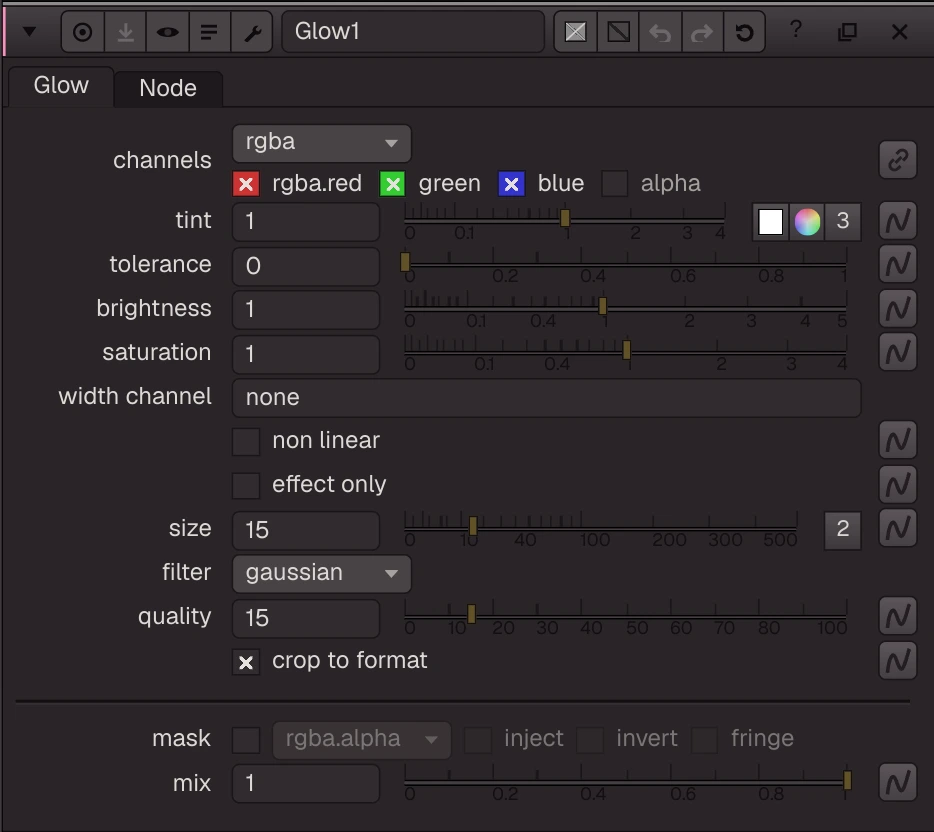
Glow2: makes bright areas glow — the parts above tolerance are blurred (size, filter, quality as Blur), tinted, saturated, scaled by brightness and added to the image.
Glow2: makes bright areas glow — the parts above tolerance are blurred (size, filter, quality as Blur), tinted, saturated, scaled by brightness and added to the image. effect only gives the glow alone. Width channel lets another channel scale the glow size per pixel; crop to format works as in Blur.
| Node | Glow2 |
|---|---|
| Type id | OC_N_glow |
| Menu | Filter › Glow |
| Nuke class | Glow2 (also imports Glow) |
| Code | opencomp_core/nodes/filter/glow.py |
Inputs and outputs
| Port | Name | Type |
|---|---|---|
| input 0 | Image | image |
| input 1 | mask | image |
| output 0 | Image | image |
Knobs
Panel tab Glow, in panel order.
| Knob | Label | Type | Default | Range / values | Nuke knob | Description |
|---|---|---|---|---|---|---|
channels | channels | menu | rgb | rgba, rgb, alpha, all, none | Layer the op applies to: rgb, rgba, alpha, all, none, <layer> or <layer>.<ch> | |
tint | tint | colour ×3 | 1, 1, 1 | 0 to 4 | tint | |
tolerance | tolerance | float | 0 | 0 to 1 | tolerance | |
brightness | brightness | float | 1 | 0 to 5 | brightness | |
saturation | saturation | float | 1 | 0 to 4 | saturation | |
width_channel | width channel | text | none | W | Nuke W: a per-pixel glow size (stored only) | |
nonlinear | non linear | bool | false | nonlinear | Nuke non linear (with the width channel; stored only) | |
effect_only | effect only | bool | false | effect_only | ||
size | size | wh ×2 | 15, 15 | 0 to 500 | size | |
filter | filter | menu | GAUSSIAN | BOX (box), TRIANGLE (triangle), QUADRATIC (quadratic), GAUSSIAN (gaussian) | filter | |
quality | quality | float | 15 | 0 to 100 (integer) | quality | |
crop | crop to format | bool | true | crop | ||
mask_channel | mask | menu | none | none, rgba.alpha, rgba.red, rgba.green, rgba.blue | Mask channel, e.g. rgba.alpha (none = no mask) | |
inject | inject | bool | false | Copy the mask into mask.a for nodes downstream | ||
invert_mask | invert | bool | false | invert_mask | ||
fringe | fringe | bool | false | Only apply the effect at the edges of the mask | ||
mix | mix | float | 1 | 0 to 1 | mix |
Other knobs (Python, .nk and the assistant; not on the panel)
| Knob | Label | Type | Default | Range / values | Nuke knob | Description |
|---|---|---|---|---|---|---|
gl_color | Viewer Controls Color | float ×3 | 0, 0, 0 | 0 to 1 | ||
postage_stamp_frame | Static Frame | int | 1 | -2147483648 to 2147483647 | ||
lifetimeStart | Lifetime Start | int | 0 | -2147483648 to 2147483647 | ||
lifetimeEnd | Lifetime End | int | 100 | -2147483648 to 2147483647 | ||
useLifetime | Use Lifetime | boolean | false | |||
cached | Cached | boolean | false | |||
bookmark | Bookmark | boolean | false | |||
dope_sheet | Dope Sheet | boolean | false | |||
clone_group | Clone Group | string | ||||
link_source | Link Source | string | ||||
link_overrides | Link Overrides | string | ||||
split_views | Split Views | string | ||||
unpremult | (Un)premult by | enum | none | none, rgba.alpha | ||
invert_unpremult | invert | boolean | false | (Un)premultiply by 1 - alpha |
Nuke equivalent
Imports from and exports to Nuke's Glow2 (Glow also import to it). The standard Nuke mask knobs (channels, mask, invert, (un)premult, mix) are mapped too.
Knobs with a different name here:
| Nuke knob | Knob here |
|---|---|
W | width_channel |
Nuke knobs not in this list import as a knob of the same name, or are kept unchanged for export. See .nk import.
Examples
Open these from Help › Examples…, or from the ? menu in this node's Properties panel.
- Glow (
examples/filter/glow.oink): Glow adds a blurred copy of the bright parts back on top. Tolerance sets how bright a pixel must be to glow.