Nodes
KeyMix
KeyMix — copy A onto B through a mask.
| Node | KeyMix |
|---|---|
| Type id | OC_N_keymix |
| Menu | Merge › KeyMix |
| Nuke class | KeyMix |
| Code | opencomp_core/nodes/merge/keymix.py |
Inputs and outputs
| Port | Name | Type |
|---|---|---|
| input 0 | B | image |
| input 1 | A | image |
| input 2 | mask | image |
| output 0 | Image | image |
Knobs
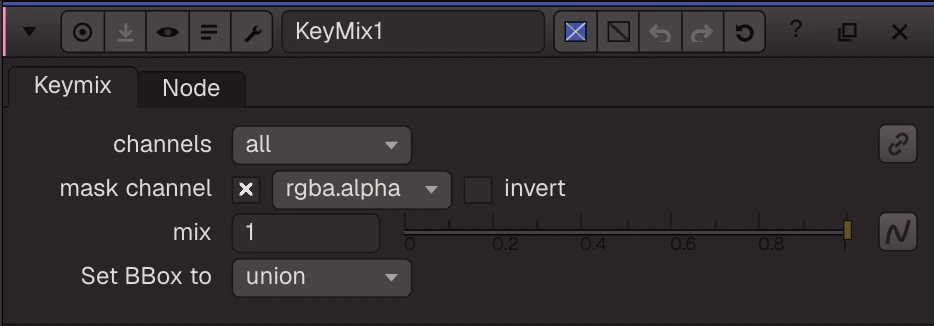
Panel tab Keymix, in panel order.
| Knob | Label | Type | Default | Range / values | Nuke knob | Description |
|---|---|---|---|---|---|---|
channels | channels | menu | all | rgba, rgb, alpha, all, none | channels | Channels copied from A; the rest come from B |
mask_channel | mask channel | menu | rgba.alpha | none, rgba.alpha, rgba.red, rgba.green, rgba.blue | maskChannel | Channel of the mask input (none = A everywhere) |
invert_mask | invert | bool | false | invertMask | ||
mix | mix | float | 1 | 0 to 1 | mix | |
bbox | Set BBox to | menu | union | union, B side, A side | bbox |
Other knobs (Python, .nk and the assistant; not on the panel)
| Knob | Label | Type | Default | Range / values | Nuke knob | Description |
|---|---|---|---|---|---|---|
gl_color | Viewer Controls Color | float ×3 | 0, 0, 0 | 0 to 1 | ||
postage_stamp_frame | Static Frame | int | 1 | -2147483648 to 2147483647 | ||
lifetimeStart | Lifetime Start | int | 0 | -2147483648 to 2147483647 | ||
lifetimeEnd | Lifetime End | int | 100 | -2147483648 to 2147483647 | ||
useLifetime | Use Lifetime | boolean | false | |||
cached | Cached | boolean | false | |||
bookmark | Bookmark | boolean | false | |||
dope_sheet | Dope Sheet | boolean | false | |||
clone_group | Clone Group | string | ||||
link_source | Link Source | string | ||||
link_overrides | Link Overrides | string | ||||
split_views | Split Views | string |
Nuke equivalent
Imports from and exports to Nuke's KeyMix.
Knobs with a different name here:
| Nuke knob | Knob here |
|---|---|
maskChannel | mask_channel |
invertMask | invert_mask |
Nuke knobs not in this list import as a knob of the same name, or are kept unchanged for export. See .nk import.