Relight
Relight: adds light to the plate from its N (normals) and depth layers, all on the GPU.
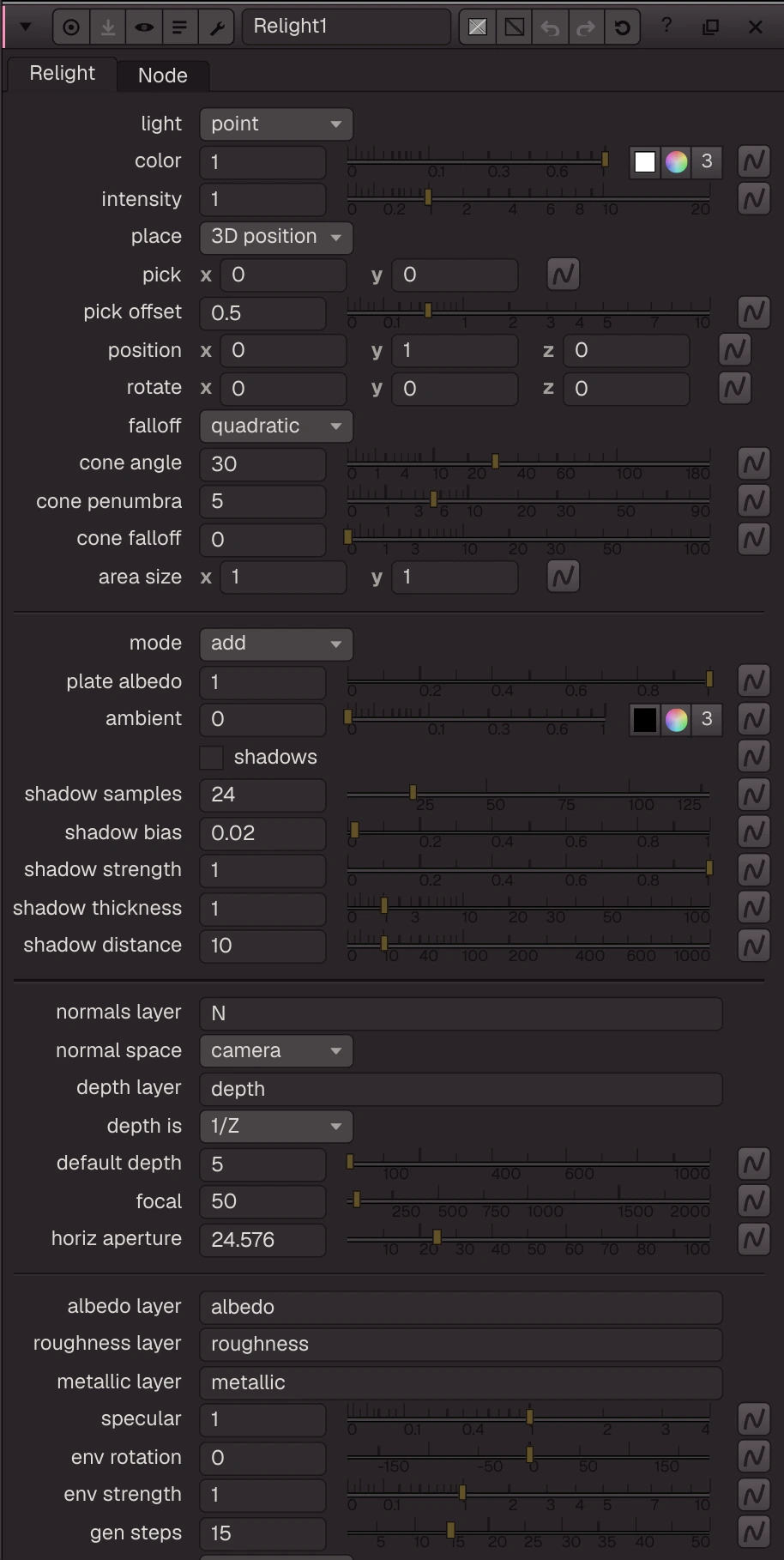
Relight: adds light to the plate from its N (normals) and depth layers, all on the GPU. Built-in light (point / spot / area / directional; place in 3D or pick a pixel) plus any lights in the lights input; camera from cam or the focal knobs. Mode add (plate colour as albedo), multiply, light only, materials (AIMaterials albedo x light + GGX specular from roughness / metallic) or generative (Cosmos DiffusionRenderer re-renders the plate under the env HDR map; Generate in the panel). Optional screen-space shadows.
| Node | Relight |
|---|---|
| Type id | OC_N_relight |
| Menu | 3D › Relight |
| Nuke class | none: saved in .nk files as an Oink node |
| Code | opencomp_core/nodes/three_d/relight.py |
Inputs and outputs
| Port | Name | Type |
|---|---|---|
| input 0 | Image | image |
| input 1 | lights | scene |
| input 2 | cam | scene |
| input 3 | env | image |
| output 0 | Image | image |
Knobs
Panel tab Relight, in panel order.
| Knob | Label | Type | Default | Range / values | Nuke knob | Description |
|---|---|---|---|---|---|---|
light_type | light | menu | point | point, spot, area, directional, none (none (lights input only)) | ||
color | color | colour ×3 | 1, 1, 1 | 0 to 1 | ||
intensity | intensity | float | 1 | 0 to 20 | ||
position_mode | place | menu | 3d | 3d (3D position), image (pick on image) | ||
pick | pick | vector ×2 | 0, 0 | 0 to 4096 | Pixel (Nuke coords) the light sits in front of | |
pick_offset | pick offset | float | 0.5 | 0 to 10 | Distance from the picked surface towards the camera | |
position | position | vector ×3 | 0, 1, 0 | -100 to 100 | ||
rotate | rotate | vector ×3 | 0, 0, 0 | -180 to 180 | Light direction: -Z rotated (degrees, ZXY like Nuke lights) | |
falloff_type | falloff | menu | quadratic | none, linear, quadratic, cubic | ||
cone_angle | cone angle | float | 30 | 0 to 180 | ||
cone_penumbra_angle | cone penumbra | float | 5 | 0 to 90 | ||
cone_falloff | cone falloff | float | 0 | 0 to 100 | ||
area_size | area size | vector ×2 | 1, 1 | 0 to 20 | ||
mode | mode | menu | add | add, multiply, light (light only), materials, generative (generative (AI)) | ||
albedo | plate albedo | float | 1 | 0 to 1 | add: how much the plate colour tints the added light | |
ambient | ambient | colour ×3 | 0, 0, 0 | 0 to 1 | ||
shadows | shadows | bool | false | |||
shadow_samples | shadow samples | float | 24 | 1 to 128 (integer) | ||
shadow_bias | shadow bias | float | 0.02 | 0 to 1 | Relative depth tolerance | |
shadow_strength | shadow strength | float | 1 | 0 to 1 | ||
shadow_thickness | shadow thickness | float | 1 | 0 to 100 | Occluders are assumed this thick (scene units) | |
shadow_distance | shadow distance | float | 10 | 0 to 1000 | March length for directional lights | |
normal_layer | normals layer | text | N | Layer holding normals (xyz); missing = normals from depth | ||
normal_space | normal space | menu | camera | camera, world | ||
depth_layer | depth layer | text | depth | |||
depth_convention | depth is | menu | inv | inv (1/Z), z (Z) | ||
default_depth | default depth | float | 5 | 0.001 to 1000 | Z used where there is no depth layer | |
focal | focal | float | 50 | 1 to 2000 | ||
haperture | horiz aperture | float | 24.576 | 0.1 to 100 | ||
albedo_layer | albedo layer | text | albedo | Base colour layer; present = diffuse is albedo x light | ||
roughness_layer | roughness layer | text | roughness | Roughness layer (.r); present = GGX specular | ||
metallic_layer | metallic layer | text | metallic | |||
specular | specular | float | 1 | 0 to 4 | Scale of the GGX specular (0 = diffuse only) | |
env_rotation | env rotation | float | 0 | -180 to 180 | ||
env_strength | env strength | float | 1 | 0 to 10 | ||
gen_steps | gen steps | float | 15 | 1 to 50 (integer) | ||
gen_precision | gen precision | menu | auto | auto, bf16, fp8 | ||
mix | mix | float | 1 | 0 to 1 |
Other knobs (Python, .nk and the assistant; not on the panel)
| Knob | Label | Type | Default | Range / values | Nuke knob | Description |
|---|---|---|---|---|---|---|
gl_color | Viewer Controls Color | float ×3 | 0, 0, 0 | 0 to 1 | ||
postage_stamp_frame | Static Frame | int | 1 | -2147483648 to 2147483647 | ||
lifetimeStart | Lifetime Start | int | 0 | -2147483648 to 2147483647 | ||
lifetimeEnd | Lifetime End | int | 100 | -2147483648 to 2147483647 | ||
useLifetime | Use Lifetime | boolean | false | |||
cached | Cached | boolean | false | |||
bookmark | Bookmark | boolean | false | |||
dope_sheet | Dope Sheet | boolean | false | |||
clone_group | Clone Group | string | ||||
link_source | Link Source | string | ||||
link_overrides | Link Overrides | string | ||||
split_views | Split Views | string | ||||
gen_depth_layer | Gen Depth | string | depth | AIMaterials relative depth layer for the generative mode | ||
gen_chunk | Gen Window | int | 57 | 1 to 57 | ||
gen_seed | Gen Seed | int | 1000 | -2147483648 to 2147483647 | ||
gen_results | Generated | string | {} |
Nuke equivalent
No Nuke class. In a .nk file this node is written as an Oink node that Nuke will not recognise.
Examples
Open these from Help › Examples…, or from the ? menu in this node's Properties panel.
- Relight from rendered normals and depth (
examples/3d/relight_normals.oink): ScanlineRender writes normals (N) and depth; Relight adds a point light using them, the way you relight a CG pass in comp. Move the light's position knob to see the shading follow the shapes.