Grade
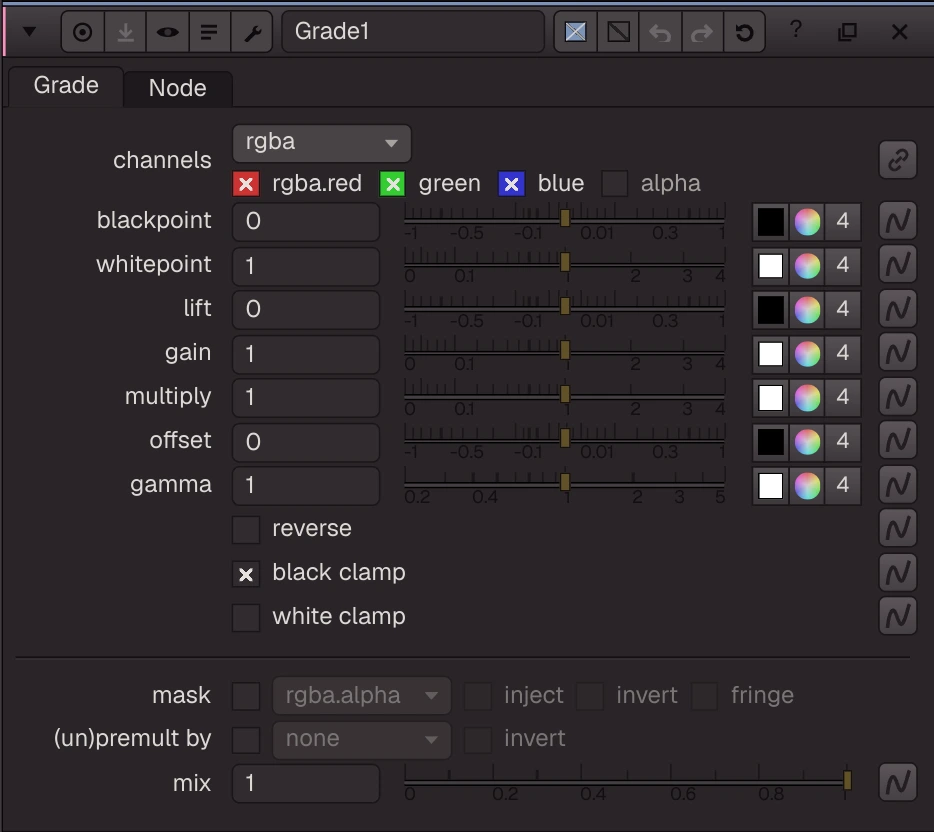
Adjusts the colour range: blackpoint/whitepoint set the input range, lift/gain the output range, then multiply, offset and gamma.
Adjusts the colour range: blackpoint/whitepoint set the input range, lift/gain the output range, then multiply, offset and gamma. reverse undoes a grade. black clamp (on by default) and white clamp limit the result. The channels, mask, inject, fringe, (un)premult by and mix knobs work as on other Nuke colour nodes, all in one pass.
| Node | Grade |
|---|---|
| Type id | OC_N_grade |
| Menu | Color › Grade |
| Nuke class | Grade |
| Code | opencomp_core/nodes/color/grade.py |
Inputs and outputs
| Port | Name | Type |
|---|---|---|
| input 0 | Image | image |
| input 1 | mask | image |
| output 0 | Image | image |
Knobs
Panel tab Grade, in panel order.
| Knob | Label | Type | Default | Range / values | Nuke knob | Description |
|---|---|---|---|---|---|---|
channels | channels | menu | rgb | rgba, rgb, alpha, all, none | Layer the op applies to: rgb, rgba, alpha, all, none, <layer> or <layer>.<ch> | |
blackpoint | blackpoint | colour ×4 | 0, 0, 0, 0 | -1 to 1 | blackpoint | |
whitepoint | whitepoint | colour ×4 | 1, 1, 1, 1 | 0 to 4 | whitepoint | |
lift | lift | colour ×4 | 0, 0, 0, 0 | -1 to 1 | black | |
gain | gain | colour ×4 | 1, 1, 1, 1 | 0 to 4 | white | |
multiply | multiply | colour ×4 | 1, 1, 1, 1 | 0 to 4 | multiply | |
offset | offset | colour ×4 | 0, 0, 0, 0 | -1 to 1 | add | |
gamma | gamma | colour ×4 | 1, 1, 1, 1 | 0.2 to 5 | gamma | |
reverse | reverse | bool | false | reverse | ||
black_clamp | black clamp | bool | true | black_clamp | ||
white_clamp | white clamp | bool | false | white_clamp | ||
mask_channel | mask | menu | none | none, rgba.alpha, rgba.red, rgba.green, rgba.blue | Mask channel, e.g. rgba.alpha (none = no mask) | |
inject | inject | bool | false | Copy the mask into mask.a for nodes downstream | ||
invert_mask | invert | bool | false | invert_mask | ||
fringe | fringe | bool | false | Only apply the effect at the edges of the mask | ||
unpremult | (un)premult by | menu | none | none, rgba.alpha | ||
invert_unpremult | invert | bool | false | (Un)premultiply by 1 - alpha | ||
mix | mix | float | 1 | 0 to 1 | mix |
Other knobs (Python, .nk and the assistant; not on the panel)
| Knob | Label | Type | Default | Range / values | Nuke knob | Description |
|---|---|---|---|---|---|---|
gl_color | Viewer Controls Color | float ×3 | 0, 0, 0 | 0 to 1 | ||
postage_stamp_frame | Static Frame | int | 1 | -2147483648 to 2147483647 | ||
lifetimeStart | Lifetime Start | int | 0 | -2147483648 to 2147483647 | ||
lifetimeEnd | Lifetime End | int | 100 | -2147483648 to 2147483647 | ||
useLifetime | Use Lifetime | boolean | false | |||
cached | Cached | boolean | false | |||
bookmark | Bookmark | boolean | false | |||
dope_sheet | Dope Sheet | boolean | false | |||
clone_group | Clone Group | string | ||||
link_source | Link Source | string | ||||
link_overrides | Link Overrides | string | ||||
split_views | Split Views | string |
Nuke equivalent
Imports from and exports to Nuke's Grade. The standard Nuke mask knobs (channels, mask, invert, (un)premult, mix) are mapped too.
Knobs with a different name here:
| Nuke knob | Knob here |
|---|---|
black | lift |
white | gain |
add | offset |
Nuke knobs not in this list import as a knob of the same name, or are kept unchanged for export. See .nk import.
Examples
Open these from Help › Examples…, or from the ? menu in this node's Properties panel.
- Shuffle a depth layer (
examples/channel/shuffle_depth.oink): The Beachball single-part file holds rgba, Z, disparity, motion and masks in one part. The Shuffle puts depth (Z) in rgb and the Grade maps the depth range to something you can see. - Grade: blackpoint, lift, gain, gamma (
examples/color/grade_basics.oink): A warm grade on the Mt Tamalpais photo: lift the blacks a little, gain the reds, add a touch of gamma. Grade works in scene-linear; values above 1 stay above 1 (white clamp off). - Premultiplied colour: Unpremult, grade, Premult (
examples/merge/premult_handling.oink): Colour corrections on a premultiplied render go between Unpremult and Premult, so edges keep their colour. PrismsLenses.exr is premultiplied with alpha 0 but rgb above 0 in places (glows); those pixels are left alone by Unpremult (alpha 0).