Shuffle
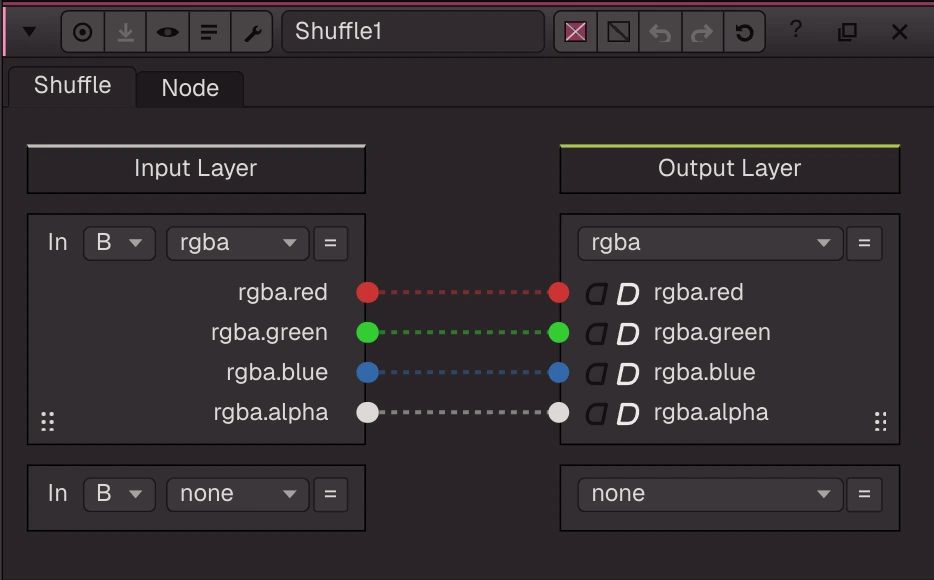
Rearranges channels (Nuke's Shuffle2): drag wires from the input layers (in1 / in2, each read from the B or the A input) to the output layers (out1 / out2).
Rearranges channels (Nuke's Shuffle2): drag wires from the input layers (in1 / in2, each read from the B or the A input) to the output layers (out1 / out2). One input channel can feed several outputs; the black / white buttons set an output to 0 / 1; unconnected outputs and every other layer pass through from B. An output layer with no wire yet still exists on the output (listed, black when read). Ctrl+drag, Ctrl+Shift+drag, Alt+drag, double-click and dragging a layer's grip are the Nuke shortcuts. 'new' in a layer menu makes a layer.
| Node | Shuffle |
|---|---|
| Type id | OC_N_shuffle |
| Menu | Channel › Shuffle |
| Nuke class | Shuffle2 (also imports Shuffle, ShuffleCopy) |
| Code | opencomp_core/nodes/merge/shuffle.py |
Inputs and outputs
| Port | Name | Type |
|---|---|---|
| input 0 | Image | image |
| input 1 | A | image |
| output 0 | Image | image |
Knobs
Panel tab Shuffle, in panel order.
| Knob | Label | Type | Default | Range / values | Nuke knob | Description |
|---|---|---|---|---|---|---|
in_layer | in1 | text | rgba | First input layer ('none' = unused) | ||
in1_from | fromInput1 | menu | B | B, A | ||
in2_layer | in2 | text | none | Second input layer ('none' = unused) | ||
in2_from | fromInput2 | menu | B | B, A | ||
out_layer | out1 | text | rgba | First output layer ('none' = unused) | ||
out2_layer | out2 | text | none | Second output layer ('none' = unused) | ||
mappings | mappings | text | 4 rgba.red 0 0 rgba.red 0 0 rgba.green 0 1 rgba.green 0 1 rgba.blue 0 2 rgba.blue 0 2 rgba.alpha 0 3 rgba.alpha 0 3 | Nuke Shuffle2 mappings: count, then 'src group index dst group index' per connection ('' = the legacy per-channel knobs) |
Other knobs (Python, .nk and the assistant; not on the panel)
| Knob | Label | Type | Default | Range / values | Nuke knob | Description |
|---|---|---|---|---|---|---|
gl_color | Viewer Controls Color | float ×3 | 0, 0, 0 | 0 to 1 | ||
postage_stamp_frame | Static Frame | int | 1 | -2147483648 to 2147483647 | ||
lifetimeStart | Lifetime Start | int | 0 | -2147483648 to 2147483647 | ||
lifetimeEnd | Lifetime End | int | 100 | -2147483648 to 2147483647 | ||
useLifetime | Use Lifetime | boolean | false | |||
cached | Cached | boolean | false | |||
bookmark | Bookmark | boolean | false | |||
dope_sheet | Dope Sheet | boolean | false | |||
clone_group | Clone Group | string | ||||
link_source | Link Source | string | ||||
link_overrides | Link Overrides | string | ||||
split_views | Split Views | string | ||||
r_source | R | enum | R | R, G, B, A, ZERO, ONE, R2, G2, B2, A2 | ||
g_source | G | enum | G | R, G, B, A, ZERO, ONE, R2, G2, B2, A2 | ||
b_source | B | enum | B | R, G, B, A, ZERO, ONE, R2, G2, B2, A2 | ||
a_source | A | enum | A | R, G, B, A, ZERO, ONE, R2, G2, B2, A2 | ||
r2_source | out 2 R | enum | R2 | R, G, B, A, ZERO, ONE, R2, G2, B2, A2 | ||
g2_source | out 2 G | enum | G2 | R, G, B, A, ZERO, ONE, R2, G2, B2, A2 | ||
b2_source | out 2 B | enum | B2 | R, G, B, A, ZERO, ONE, R2, G2, B2, A2 | ||
a2_source | out 2 A | enum | A2 | R, G, B, A, ZERO, ONE, R2, G2, B2, A2 |
Nuke equivalent
Imports from and exports to Nuke's Shuffle2 (Shuffle, ShuffleCopy also import to it).
Nuke knobs not in this list import as a knob of the same name, or are kept unchanged for export. See .nk import.
Examples
Open these from Help › Examples…, or from the ? menu in this node's Properties panel.
- Shuffle a depth layer (
examples/channel/shuffle_depth.oink): The Beachball single-part file holds rgba, Z, disparity, motion and masks in one part. The Shuffle puts depth (Z) in rgb and the Grade maps the depth range to something you can see. - Cryptomatte layers (
examples/cryptomatte/cryptomatte_layers.oink): Psyop's Cryptomatte sample render (BSD-3-Clause): the file carries a preview layer (uCryptoObject, one flat colour per object) and the ID/coverage rank layers uCryptoObject00-02. The Shuffle shows the preview layer; switch its input layer to uCryptoObject00 to see raw IDs (red, blue) and coverage (green, alpha). - Multi-part stereo EXR sequence (
examples/io/read_multipart_stereo.oink): The Beachball sequence stored as EXR 2.0 multi-part files: one layer per part, left and right views, and a different data window per part. The Shuffle pulls the forward motion vectors into rgb.