Merge
Layers the A input with the B input using the chosen operation (30 operations, over by default).
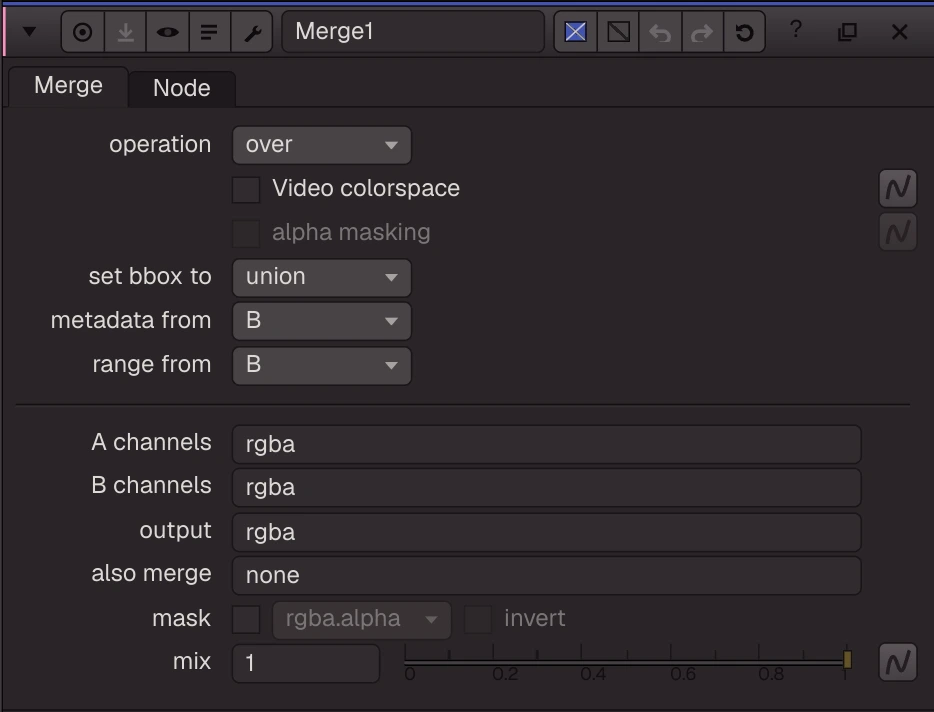
Layers the A input with the B input using the chosen operation (30 operations, over by default). Connect A to the spare input to add A2, A3 and more; each one is merged onto the result in order. Video colorspace does the maths in sRGB. alpha masking only applies to the blend operations. set bbox to picks the size of the result; range from and metadata from are kept for .nk files only.
| Node | Merge |
|---|---|
| Type id | OC_N_merge |
| Menu | Merge › Merge |
| Nuke class | Merge2 (also imports Merge) |
| Code | opencomp_core/nodes/merge/merge.py |
Inputs and outputs
| Port | Name | Type |
|---|---|---|
| input 0 | B | image |
| input 1 | A | image |
| input 2 | mask | image |
| output 0 | Image | image |
Knobs
Panel tab Merge, in panel order.
| Knob | Label | Type | Default | Range / values | Nuke knob | Description |
|---|---|---|---|---|---|---|
operation | operation | menu | over | atop, average, color-burn, color-dodge, conjoint-over, copy, difference, disjoint-over, divide, exclusion, from, geometric, hard-light, hypot, in, mask, matte, max, min, minus, multiply, out, over, overlay, plus, screen, soft-light, sten... | operation | |
sRGB | Video colorspace | bool | false | sRGB | Merge in sRGB (the 8-bit colorspace), then back to linear | |
alpha_masking | alpha masking | bool | false | screen_alpha | ||
bbox | set bbox to | menu | union | union, intersection, A, B | bbox | |
metadata_from | metadata from | menu | B | B, A, All | metainput | |
range_from | range from | menu | B | B, A, All | rangeinput | |
a_channels | A channels | text | rgba | Achannels | Layer taken from A ('none' = black); its alpha is a | |
b_channels | B channels | text | rgba | Bchannels | Layer taken from B ('none' = black); its alpha is b | |
output | output | text | rgba | output | Layer written: rgba, rgb, alpha or any layer name | |
also_merge | also merge | text | none | also_merge | Extra layer merged with the same operation | |
mask_channel | mask | menu | none | none, rgba.alpha, rgba.red, rgba.green, rgba.blue | Mask channel, e.g. rgba.alpha (none = no mask; a linked mask input then uses rgba.alpha) | |
invert_mask | invert | bool | false | invert_mask | ||
mix | mix | float | 1 | 0 to 1 | mix |
Other knobs (Python, .nk and the assistant; not on the panel)
| Knob | Label | Type | Default | Range / values | Nuke knob | Description |
|---|---|---|---|---|---|---|
gl_color | Viewer Controls Color | float ×3 | 0, 0, 0 | 0 to 1 | ||
postage_stamp_frame | Static Frame | int | 1 | -2147483648 to 2147483647 | ||
lifetimeStart | Lifetime Start | int | 0 | -2147483648 to 2147483647 | ||
lifetimeEnd | Lifetime End | int | 100 | -2147483648 to 2147483647 | ||
useLifetime | Use Lifetime | boolean | false | |||
cached | Cached | boolean | false | |||
bookmark | Bookmark | boolean | false | |||
dope_sheet | Dope Sheet | boolean | false | |||
clone_group | Clone Group | string | ||||
link_source | Link Source | string | ||||
link_overrides | Link Overrides | string | ||||
split_views | Split Views | string | ||||
mode | Mode | enum | NONE | NONE, PLUS, MULTIPLY, SCREEN |
Nuke equivalent
Imports from and exports to Nuke's Merge2 (Merge also import to it).
Knobs with a different name here:
| Nuke knob | Knob here |
|---|---|
Achannels | a_channels |
Bchannels | b_channels |
metainput | metadata_from |
rangeinput | range_from |
screen_alpha | alpha_masking |
Nuke knobs not in this list import as a knob of the same name, or are kept unchanged for export. See .nk import.
Examples
Open these from Help › Examples…, or from the ? menu in this node's Properties panel.
- Greenscreen: ScreenKey, Despill, comp over a sky (
examples/keying/greenscreen_key_despill.oink): Tears of Steel plate 08_3a (CC BY 3.0, Blender Foundation, mango.blender.org): an actor on a green screen that falls off towards the frame edges. ScreenKey pulls the key from a screen colour picked over the open screen (Ctrl+click or Ctrl+Shift+drag in the Viewer with its panel open), with screen gain 1.1 and clip black / white 0.1 / 0.9 for the uneven screen; its own despill is off so the Despill node (average) does it. The premultiplied result goes over a Poly Haven sky (CC0) reformatted to the plate. The same chain ships as the Keying ToolSet. - Merge operations: multiply, screen, plus (
examples/merge/merge_operations.oink): Three Merges on the same A and B: multiply (darkens), screen (lightens), plus (adds light). The Switch picks which one the Viewer sees; change its "which" knob to compare. - Merge over (
examples/merge/merge_over.oink): A premultiplied CG render (CandleGlass, alpha 0 with non-zero rgb in places) scaled down and merged over a photo with Merge (over): A over B = A + B * (1 - A.alpha). - CornerPin a photo onto a plate (
examples/transform/cornerpin.oink): CornerPin maps the four corners of the source (from1-4) to four points (to1-4). The pinned photo is merged over another plate, like a screen replacement.